
Download Simple Free Teleprompter – Chrome Apps, Presentation Tool, Presenter View
Overview
The Simple Free Teleprompter is a lightweight desktop application designed to assist presenters, speakers, and content creators with smooth, distraction-free delivery of spoken scripts. Built for both single-monitor and dual-monitor setups, it enables users to display text in full-screen mode while maintaining full control over scrolling speed, text direction, and display layout. The software supports both LTR (left-to-right) and RTL (right-to-left) languages, making it suitable for a broad international audience. It is particularly useful for recording videos, live streaming, public speaking, and on-camera presentations.
Users can paste their script into the built-in editor, start automatic scrolling with a single click, and adjust the pace in real time using the intuitive slider or keyboard shortcuts. The tool is optimized for minimal distraction, ensuring that the speaker remains focused on delivery rather than technical details. The developer did not provide additional information about the background or company, but the software’s straightforward design and consistent updates suggest a dedicated individual or small team focused on usability and functionality.
Real-world use cases include news anchors, educators, YouTubers, and corporate trainers who need a reliable, no-frills teleprompter solution. The software’s ability to detect display configuration changes dynamically means users don’t need to restart the app when switching between monitors or adjusting screen layouts, enhancing workflow continuity.
Key Features & Capabilities
- Full-screen display mode – Minimizes distractions by showing only the text, ideal for on-camera performances or live presentations.
- Real-time scroll speed control – Adjust scrolling speed using a dragable slider or keyboard shortcuts (arrow keys with SHIFT for fine-tuning, CTRL for coarse adjustments).
- Multi-monitor support with presenter view – Enables dual-monitor setups where the presenter sees their script on one screen while the audience views the mirrored output on another.
- Text direction flexibility – Supports both LTR and RTL text alignment, with an "Automatic" option that detects language direction dynamically.
- Customizable display settings – Users can adjust font size, color, background color, horizontal margins, and center marker appearance (show/hide, color, opacity, line thickness, vertical position).
- Save and load presentations – Scripts can be saved as plain text files and loaded later, allowing for reuse and organization of content.
- Screen mirroring options – Offers horizontal, vertical, both, or no mirroring, adaptable to various camera and monitor configurations.
- Auto-scroll bug fixes and stability improvements – Ongoing updates address previous issues with auto-scrolling, fullscreen behavior, and file overwrite errors.
- Chromecast support (v1.1.0) – Allows users to stream the teleprompter output to a TV or projector via Chromecast, expanding its utility in larger venues.
These features collectively support efficient, professional-grade presentations without the need for complex software. For example, a YouTuber can prepare a script, save it, and reuse it across multiple videos, while a speaker at a conference can adjust text speed and orientation on the fly. The ability to prevent accidental mouse wheel scrolling ensures uninterrupted performance during live delivery.
User Interface, Workflow & Performance
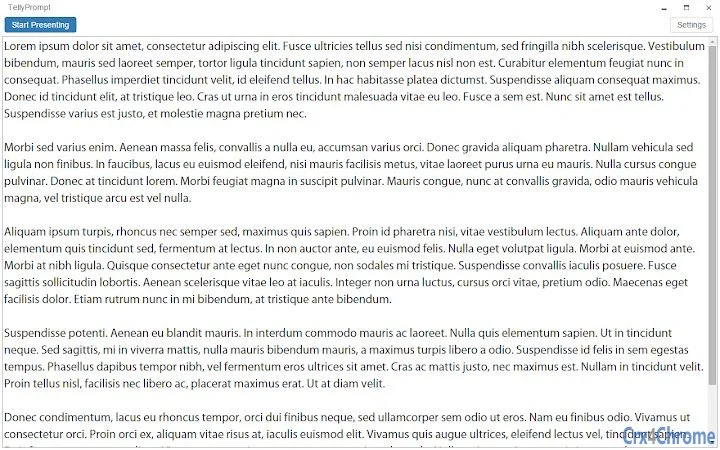
The user interface is minimalistic and focused on core functionality. The main window consists of a text editor and a playback control panel with a Start/Pause button and a scroll speed slider. The layout is clean, with clear separation between input and output areas. Navigation is straightforward: users paste their script, adjust settings, and click “Start Presenting” to enter full-screen mode.
Workflow efficiency is high due to the direct, no-confirmation path from script input to presentation. The app automatically adapts to changes in display configuration, eliminating the need for manual restarts when switching between monitors. This dynamic response enhances usability in environments with variable setups.
Performance observations are based on general software behavior patterns. The application is lightweight, with a file size of 2.8 MB, suggesting low system resource usage. The developer did not specify resource usage details, but such a small footprint typically correlates with minimal CPU and RAM impact. Stability appears to be improving with each release, as evidenced by the consistent bug fixes in recent versions, particularly around auto-scrolling and file handling.
Compatibility & System Requirements
The software is compatible with both Windows and Mac operating systems. The latest version, v1.1.0, is designed to run on modern desktop environments, though exact hardware requirements were not listed. Installation size is 2.8 MB, indicating a lightweight deployment that should fit on most systems without strain.
Platform compatibility information is limited to the operating systems provided. The software is available via the Chrome Web Store, suggesting it is built using web technologies (HTML, CSS, JavaScript) and runs within a Chrome-based runtime environment. This implies it may require the Chrome browser or a compatible runtime to function, though the exact dependency was not specified.
Exact system requirements were not listed. The developer did not provide additional information about minimum processor speed, RAM, or graphics capabilities. Users should ensure their system supports Chrome Web Store applications and has a stable internet connection for initial installation and updates.
Pros and Cons
Pros
- Completely free to use with no hidden costs or ads
- Lightweight at only 2.8 MB, suitable for older or low-spec machines
- Supports both LTR and RTL languages with automatic detection
- Real-time control over scroll speed via slider or keyboard shortcuts
- Multi-monitor support with dedicated presenter view
- Ability to save and load scripts as plain text files
- Chromecast integration for streaming to external displays
- Regular updates with meaningful bug fixes and new features
Cons
- Dependent on Chrome Web Store, which may limit availability on some systems
- No official documentation or user guide provided
- Exact system requirements and performance data not specified
- Updates may require reinstallation via Chrome Web Store
- Interface lacks advanced customization beyond basic display settings
FAQ Section
Is the Simple Free Teleprompter available for Windows and Mac?
Yes, the software is compatible with both Windows and Mac operating systems as stated in the product details.
Is the software secure to download and use?
As a Chrome Web Store application, it undergoes Google’s security review process. However, users should only install apps from trusted sources and ensure their system has up-to-date security measures in place.
How often are updates released?
Updates are released regularly, with version v1.1.0 including new features like Chromecast support and bug fixes. The developer has shown active maintenance of the application.
Can I use this tool offline?
Once installed from the Chrome Web Store, the teleprompter can typically be used offline. However, initial installation and some updates may require an internet connection.
What license type does this software use?
The software is free to use and distributed without a formal license. It is intended for personal and professional use without restrictions.
Final Thoughts + CTA
The Simple Free Teleprompter delivers a focused, reliable solution for anyone needing a no-frills tool to deliver spoken content with precision. Its clean interface, real-time controls, and support for both single and dual-monitor setups make it a strong choice for content creators, educators, and professionals. The addition of Chromecast support in v1.1.0 significantly expands its versatility in live and recorded presentations.
While it lacks detailed documentation and advanced features found in premium tools, its simplicity, low resource usage, and consistent updates more than compensate. The absence of ads and the free pricing model make it an exceptional value.
For users seeking a straightforward, dependable teleprompter that works across Windows and Mac, this tool stands out in its category. Download Simple Free Teleprompter now to enhance your next presentation, recording, or live stream.







